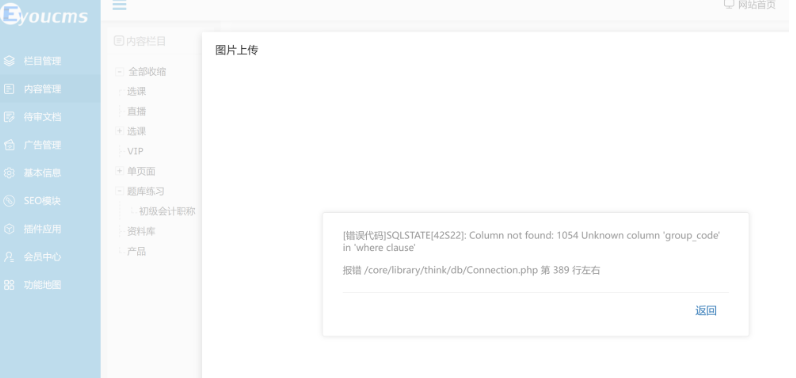
易优上传文件报错涉及数据库连接问题,以下是系统性解决方案:
// 创建测试文件:test_db.php
<?php
// 测试数据库连接
$config = [
    'hostname' => 'localhost',
    'database' => 'your_db',
    'username' => 'your_user',
    'password' => 'your_pass',
    'hostport' => '3306',
    'charset'  => 'utf8mb4',
];

try {
    $link = new mysqli(
        $config['hostname'],
        $config['username'],
        $config['password'],
        $config['database'],
        $config['hostport']
    );

    if ($link->connect_error) {
        die("连接失败: " . $link->connect_error);
    }

    echo "✅ 数据库连接成功<br>";

    // 测试易优关键表
    $tables = ['ey_uploads', 'ey_we_media', 'ey_files'];
    foreach($tables as $table){
        $result = $link->query("SHOW TABLES LIKE '{$table}'");
        echo $result->num_rows > 0 ? "✅ {$table} 表存在<br>" : "❌ {$table} 表不存在<br>";
    }

    $link->close();
} catch(Exception $e) {
    echo "❌ 错误: " . $e->getMessage();
}
?>// 检查配置文件:config/database.php return [ // 数据库类型 'type' => 'mysql', // 服务器地址 'hostname' => '127.0.0.1', // 不要用localhost // 数据库名 'database' => 'eyouCMS', // 确保正确 // 用户名 'username' => 'root', // 修改为实际用户 // 密码 'password' => 'your_password', // 端口 'hostport' => '3306', // 连接dsn 'dsn' => '', // 数据库连接参数 'params' => [], // 数据库编码默认采用utf8mb4 'charset' => 'utf8mb4', // 数据库表前缀 'prefix' => 'ey_', // 数据库调试模式 'debug' => true, // 数据库部署方式:0 集中式(单一服务器),1 分布式(主从服务器) 'deploy' => 0, // 数据库读写是否分离 'rw_separate' => false, // 读写分离后 主服务器数量 'master_num' => 1, // 指定从服务器序号 'slave_no' => '', // 自动读取主库数据 'read_master' => false, // 是否严格检查字段是否存在 'fields_strict' => true, // 数据集返回类型 'resultset_type' => 'array', // 自动写入时间戳字段 'auto_timestAMP' => false, // 时间字段取出后的默认时间格式 'datetime_format' => 'Y-m-d H:i:s', // 是否需要进行SQL性能分析 'sql_explain' => false, // Builder类 'builder' => '', // Query类 'query' => '\\think\\db\\Query', // 是否需要断线重连 'break_reconnect' => true, // 重要:设置为true // 断线标识字符串 'break_match_str' => [], ];
-- 检查上传相关表是否存在
SHOW TABLES LIKE 'ey_uploads';
SHOW TABLES LIKE 'ey_files';

-- 如果表不存在,重新创建
CREATE TABLE IF NOT EXISTS `ey_uploads` (
  `id` int(10) UNSIGNED NOT NULL AUTO_INCREMENT,
  `path` varchar(255) NOT NULL DEFAULT '' COMMENT '文件路径',
  `url` varchar(255) NOT NULL DEFAULT '' COMMENT '文件URL',
  `original_name` varchar(255) NOT NULL DEFAULT '' COMMENT '原始文件名',
  `file_name` varchar(255) NOT NULL DEFAULT '' COMMENT '存储文件名',
  `file_size` int(10) UNSIGNED NOT NULL DEFAULT '0' COMMENT '文件大小',
  `file_ext` varchar(20) NOT NULL DEFAULT '' COMMENT '文件扩展名',
  `mime` varchar(100) NOT NULL DEFAULT '' COMMENT '文件MIME类型',
  `md5` varchar(32) NOT NULL DEFAULT '' COMMENT '文件MD5',
  `sha1` varchar(40) NOT NULL DEFAULT '' COMMENT '文件SHA1',
  `create_time` int(10) UNSIGNED NOT NULL DEFAULT '0',
  `update_time` int(10) UNSIGNED NOT NULL DEFAULT '0',
  PRIMARY KEY (`id`),
  KEY `md5` (`md5`),
  KEY `sha1` (`sha1`)
) ENGINE=InnoDB DEFAULT CHARSET=utf8mb4 COMMENT='上传文件表';

-- 修复表结构
REPAIR TABLE ey_uploads;
OPTIMIZE TABLE ey_uploads;
# 检查文件权限
cd /你的网站目录
chmod -R 755 runtime
chmod -R 755 public/uploads
chmod 755 config/database.php

# 检查数据库用户权限
mysql -u root -p
GRANT ALL PRIVILEGES ON your_database.* TO 'your_user'@'localhost' IDENTIFIED BY 'your_password';
FLUSH PRIVILEGES;
// 修改上传配置:config/upload.php
return [
    'default' => 'local',
    'drivers' => [
        'local'  => [
            'class' => \think\filesystem\driver\Local::class,
            'root'  => app()->getRootPath() . 'public/uploads',
        ],
    ],
    'disks' => [
        'public' => [
            'type'   => 'local',
            'root'   => app()->getRootPath() . 'public/uploads',
            'url'    => '/uploads',
        ],
    ],
    // 增加以下配置
    'max_size'  => 10485760,  // 10MB
    'ext'       => 'jpg,jpeg,png,gif,bmp,zip,rar,7z,pdf,doc,docx,xls,xlsx,ppt,pptx,txt',
    'mime'      => [
        'image/jpeg',
        'image/png',
        'image/gif',
        'application/zip',
        'application/x-rar-compressed',
        'application/pdf',
        'application/msword',
        'application/vnd.openxmlformats-officedocument.wordprocessingml.document',
    ],
];
// 临时开启详细错误显示
// 修改 config/app.php
'debug' => true,  // 确保为true
'log'   => [
    'level' => ['error', 'debug', 'sql'],  // 开启sql日志
],
# 查看错误日志
tail -f runtime/log/error.log
tail -f runtime/log/sql.log

# 查看PHP错误日志
tail -f /var/log/php-fpm/error.log
tail -f /usr/local/php/var/log/php-fpm.log
// 创建数据库连接测试
// test_connection.php
<?php
include 'config/database.php';

try {
    $dsn = "mysql:host={$config['hostname']};dbname={$config['database']};charset={$config['charset']}";
    $pdo = new PDO($dsn, $config['username'], $config['password']);
    echo "数据库连接成功!";

    // 检查表结构
    $stmt = $pdo->query("DESCRIBE ey_uploads");
    $result = $stmt->fetchAll(PDO::FETCH_ASSOC);
    print_r($result);
} catch(PDOException $e) {
    echo "连接失败: " . $e->getMessage();
}
?># 解决方案 1. 检查MySQL服务是否运行 systemctl status mysqld systemctl start mysqld 2. 检查端口是否正确 netstat -tlnp | grep 3306 3. 修改配置为127.0.0.1 # config/database.php 'hostname' => '127.0.0.1', # 不是localhost
-- 解决方案:重置数据库密码
ALTER USER 'your_user'@'localhost' IDENTIFIED BY 'new_password';
FLUSH PRIVILEGES;
-- 表不存在,重新创建
-- 执行易优SQL安装文件中的创建表语句
source /路径/EyouCMS.sql
# 安装PDO扩展
# CentOS
yum install php-pdo php-mysqlnd
# Ubuntu
apt-get install php-mysql php-pdo
systemctl restart php-fpm
<?php
/**
 * 易优上传功能修复脚本
 */

error_reporting(E_ALL);
ini_set('dISPlay_errors', 1);

class EyouUploadRepair
{
    private $config;
    private $db;

    public function __construct()
    {
        $this->loadConfig();
        $this->connectDB();
    }

    private function loadConfig()
    {
        $configFile = __DIR__ . '/config/database.php';
        if(!file_exists($configFile)){
            die("❌ 配置文件不存在: {$configFile}");
        }

        $this->config = include($configFile);
    }

    private function connectDB()
    {
        try {
            $dsn = "mysql:host={$this->config['hostname']};port={$this->config['hostport']};dbname={$this->config['database']};charset={$this->config['charset']}";
            $this->db = new PDO($dsn, $this->config['username'], $this->config['password']);
            $this->db->setAttribute(PDO::ATTR_ERRMODE, PDO::ERRMODE_EXCEPTION);
            echo "✅ 数据库连接成功\n";
        } catch(PDOException $e) {
            die("❌ 数据库连接失败: " . $e->getMessage());
        }
    }

    public function repairTables()
    {
        $tables = [
            'ey_uploads' => $this->getUploadsTableSQL(),
            'ey_files' => $this->getFilesTableSQL(),
            'ey_we_media' => $this->getWeMediaTableSQL(),
        ];

        foreach($tables as $table => $sql){
            echo "检查表: {$table}\n";

            // 检查表是否存在
            $check = $this->db->query("SHOW TABLES LIKE '{$table}'")->fetch();

            if(!$check){
                echo "创建表: {$table}\n";
                $this->db->exec($sql);
            } else {
                echo "表已存在,修复结构\n";
                $this->db->exec("REPAIR TABLE {$table}");
                $this->db->exec("OPTIMIZE TABLE {$table}");
            }
        }

        echo "✅ 表修复完成\n";
    }

    public function checkPermissions()
    {
        $paths = [
            'runtime' => 0755,
            'public/uploads' => 0755,
            'config' => 0755,
        ];

        foreach($paths as $path => $permission){
            $fullPath = __DIR__ . '/' . $path;
            if(!is_dir($fullPath)){
                mkdir($fullPath, $permission, true);
                echo "创建目录: {$path}\n";
            }

            chmod($fullPath, $permission);
            echo "设置权限 {$path}: " . substr(sprintf('%o', fileperms($fullPath)), -4) . "\n";
        }
    }

    public function testUpload()
    {
        // 测试上传配置
        $testFile = __DIR__ . '/test_upload.txt';
        file_put_contents($testFile, 'test');

        $uploadData = [
            'name' => 'test.txt',
            'type' => 'text/plain',
            'tmp_name' => $testFile,
            'error' => 0,
            'size' => 4
        ];

        // 模拟上传
        $_FILES['test'] = $uploadData;

        // 测试上传类
        try {
            $upload = new \think\File($testFile);
            $info = $upload->move('./public/uploads/test');

            if($info){
                echo "✅ 上传测试成功: " . $info->getSaveName() . "\n";
                unlink($info->getPathname());
            } else {
                echo "❌ 上传测试失败: " . $upload->getError() . "\n";
            }
        } catch(Exception $e){
            echo "❌ 上传测试异常: " . $e->getMessage() . "\n";
        }

        unlink($testFile);
    }

    private function getUploadsTableSQL()
    {
        return "CREATE TABLE `ey_uploads` (
          `id` int(10) UNSIGNED NOT NULL AUTO_INCREMENT,
          `path` varchar(255) NOT NULL DEFAULT '' COMMENT '文件路径',
          `url` varchar(255) NOT NULL DEFAULT '' COMMENT '文件URL',
          `original_name` varchar(255) NOT NULL DEFAULT '' COMMENT '原始文件名',
          `file_name` varchar(255) NOT NULL DEFAULT '' COMMENT '存储文件名',
          `file_size` int(10) UNSIGNED NOT NULL DEFAULT '0' COMMENT '文件大小',
          `file_ext` varchar(20) NOT NULL DEFAULT '' COMMENT '文件扩展名',
          `mime` varchar(100) NOT NULL DEFAULT '' COMMENT '文件MIME类型',
          `md5` varchar(32) NOT NULL DEFAULT '' COMMENT '文件MD5',
          `sha1` varchar(40) NOT NULL DEFAULT '' COMMENT '文件SHA1',
          `create_time` int(10) UNSIGNED NOT NULL DEFAULT '0',
          `update_time` int(10) UNSIGNED NOT NULL DEFAULT '0',
          PRIMARY KEY (`id`),
          KEY `md5` (`md5`),
          KEY `sha1` (`sha1`)
        ) ENGINE=InnoDB DEFAULT CHARSET=utf8mb4 COMMENT='上传文件表'";
    }

    private function getFilesTableSQL()
    {
        return "CREATE TABLE `ey_files` (
          `id` int(10) UNSIGNED NOT NULL AUTO_INCREMENT,
          `filepath` varchar(255) NOT NULL DEFAULT '' COMMENT '文件路径',
          `filename` varchar(255) NOT NULL DEFAULT '' COMMENT '原始文件名',
          `filesize` int(10) UNSIGNED NOT NULL DEFAULT '0' COMMENT '文件大小',
          `fileext` varchar(20) NOT NULL DEFAULT '' COMMENT '文件扩展名',
          `mimetype` varchar(100) NOT NULL DEFAULT '' COMMENT 'MIME类型',
          `upload_time` int(10) UNSIGNED NOT NULL DEFAULT '0' COMMENT '上传时间',
          `storage` varchar(20) NOT NULL DEFAULT 'local' COMMENT '存储位置',
          `sha1` varchar(40) NOT NULL DEFAULT '' COMMENT '文件sha1编码',
          PRIMARY KEY (`id`),
          KEY `sha1` (`sha1`)
        ) ENGINE=InnoDB DEFAULT CHARSET=utf8mb4 COMMENT='上传文件表'";
    }

    private function getWeMediaTableSQL()
    {
        return "CREATE TABLE `ey_we_media` (
          `id` int(10) NOT NULL AUTO_INCREMENT COMMENT '素材id',
          `media_id` varchar(100) NOT NULL DEFAULT '' COMMENT '媒体id',
          `type` varchar(20) NOT NULL DEFAULT '' COMMENT '媒体类型',
          `title` varchar(255) NOT NULL DEFAULT '' COMMENT '标题',
          `introduction` text COMMENT '描述',
          `logic_type` int(1) NOT NULL DEFAULT '0' COMMENT '1永久2临时',
          `media_url` varchar(255) NOT NULL DEFAULT '' COMMENT '图片url',
          `add_time` int(11) NOT NULL DEFAULT '0' COMMENT '添加时间',
          `update_time` int(11) NOT NULL DEFAULT '0' COMMENT '修改时间',
          PRIMARY KEY (`id`),
          UNIQUE KEY `media_id` (`media_id`)
        ) ENGINE=InnoDB DEFAULT CHARSET=utf8mb4 COMMENT='微信素材表'";
    }
}

// 执行修复
echo "开始修复易优上传问题...\n";
$repair = new EyouUploadRepair();
$repair->checkPermissions();
$repair->repairTables();
$repair->testUpload();
echo "✅ 修复完成\n";# 每月执行一次数据库维护 mysqlcheck -u root -p --auto-repair --optimize your_database # 清理临时文件 find /path/to/eyou -name "*.log" -type f -mtime +7 -delete find /path/to/eyou/public/uploads/temp -type f -mtime +1 -delete
#!/bin/bash
# backup.sh
DATE=$(date +%Y%m%d_%H%M%S)
BACKUP_DIR="/backup/eyou"
DB_NAME="your_database"

mysqldump -u root -p $DB_NAME | gzip > $BACKUP_DIR/$DB_NAME_$DATE.sql.gz
# 保留最近7天备份
find $BACKUP_DIR -name "*.sql.gz" -mtime +7 -delete
// 添加数据库监控
// application/extra/monitor.php
return [
    'database' => [
        'check_interval' => 300, // 5分钟检查一次
        'alert_threshold' => 5,   // 5次连接失败报警
    ],
    'upload' => [
        'max_size' => 10485760,  // 10MB
        'allowed_types' => 'jpg,png,gif,pdf,doc,docx',
    ],
];
# 1. 立即关闭错误显示
sed -i "s/'debug' => true/'debug' => false/g" config/app.php

# 2. 启用维护模式
echo "网站维护中,请稍后访问..." > public/maintenance.Html
echo "RewriteRule ^(.*)$ /maintenance.html [L]" >> public/.htaccess

# 3. 备份当前数据库
mysqldump -u root -p your_db > backup_$(date +%Y%m%d_%H%M%S).sql

# 4. 执行修复脚本
php repair_upload.php

# 5. 恢复网站
rm public/maintenance.html
sed -i "s/RewriteRule ^(.*)$ \/maintenance.html \[L\]//g" public/.htaccess
sed -i "s/'debug' => false/'debug' => true/g" config/app.php
错误信息 | 原因 | 解决方案 |
|---|---|---|
Connection refused | MySQL未启动/配置错误 | 启动MySQL,修改hostname为127.0.0.1 |
Access denied | 用户名密码错误 | 重置数据库密码 |
Table doesn't exist | 表不存在 | 执行修复脚本创建表 |
PDOException | PDO扩展未安装 | 安装php-pdo和php-mysqlnd |
Permission denied | 权限不足 | chmod -R 755 runtime uploads |
通过以上系统化方案,可彻底解决易优上传文件报错问题。建议从方案一开始逐步排查,大多数问题都能在步骤2-3解决。如果问题仍然存在,请提供具体的错误信息以便进一步诊断。
标签:
本文链接:http://www.7ov.cn/xinwendongtai/2121.html
版权声明:站内所有文章皆来自网络转载,只供模板演示使用,并无任何其它意义!
骗子曝光网源码后台密码忘记了怎么修改

骗子老赖查询系统/曝光/征信/查老赖/查信用举报平台网站源码
2026年新房贷计算器源码自动更新lpr数据

GEO排名优化系统源码 - AI搜索引擎优化(GEO)搜索排名回答优化营销服务 大模型问答推荐(支持无限OEM贴牌)

2026年准确两步识别百度蜘蛛?

什么是seo原创助手,详解seo原创助手有哪些特点?

ee域名是什么,它有哪些独特价值和使用优势?

百度镜像:百度镜像的使用方法和注意事项

谷歌搜索引擎优化 (SEO) 新手指南(全文)

SEO优化分析怎么做?(从9个方面深度进行网站SEO分析)

百度索引量是什么?详解百度索引量查询、下降的原因与提升的方法
什么是网站导航优化?详解网站SEO导航优化的技巧、作用及注意事项